Interactive Lessons

Facts, operations and the calculator

Lecture notes

Definition

Number bonds to 10

A number bond is a pair of numbers that make a total together. The bonds of 10 are the pairs that make 10. Know them by heart: they help with every other sum.
7310
Example
, so .The partner of 7 is 3.
Rule

Add through 10

For a sum that goes over 10, first fill up to 10, then add the rest. Split the second number so that the first part makes 10.
82515
Example
→ 8 needs 2 to make 10., so .
Rule

Take away through 10

For a subtraction that goes under 10, first go back to 10, then take away the rest. Split the number you take away: the first part brings you to 10.
82515
Example
→ and ..
Rule

Bonds to 100 and 1 000

Go to the next ten (or hundred) first, then to the total. The same way of thinking works for 10, 100 and 1 000.
73271006403601 000
Example
→ , then . So . → , then . So .
Tip

Why know facts from memory?

A fact you know by heart needs no working out. Then your head is free for the hard part of a problem. Practise a little every day: knowing a fact is also knowing where it sits in the table.
×112233445566778899101056
Example
at once.No counting, no adding up.
Rule

The table square and its mirror

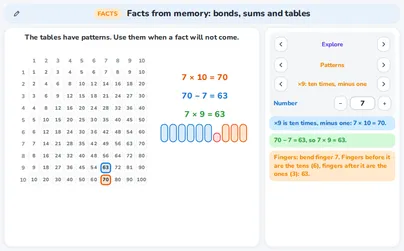
Row 7 and column 8 meet at . Row 8 and column 7 meet at . Swapping the factors gives the same product, so the square is a mirror along the diagonal. Learn one, know two.
×11223344556677889910105656
Example
.The square has 100 cells, but only 55 different facts.
Rule

The table of 2: double

Times 2 is doubling. Add the number to itself.
7714
Example
.
Rule

The table of 4: double twice

Times 4 is doubling twice. First times 2, then times 2 again.
777728
Example
→ and .So .
Rule

The table of 5: half of times 10

Times 5 is half of times 10. Multiply by 10, then halve.
353570
Example
→ and .So .
Rule

The table of 9: times 10, minus one

Times 9 is times 10 minus one group. There is also a finger trick: hold up 10 fingers and fold down the finger of the number. The fingers before it are the tens, the fingers after it are the ones.
63770
Example
→ and .Fingers: fold down finger 7. 6 fingers before it = 6 tens, 3 fingers after it = 3 ones: 63.
Rule

The table of 6: times 5, plus one more

Times 6 is times 5 plus one more group. You know the table of 5, so use it.
35742
Example
→ and .So .
Rule

The table of 8: the table of 4, doubled

Times 8 is times 4, doubled. If you know the table of 4, double the answer.
282856
Example
→ and .So .
Rule

A division fact is the other side of a table

To divide, think of the table → asks “8 times what is 56?”. Say the table of 8 until you reach 56.
×112233445566778899101056
Example
, because .
Tip

How the trainer helps you

The trainer keeps five boxes. A new fact starts in box 1. A quick right answer goes up one box. A slow or wrong answer goes back to box 1. Box 1 comes back 12 times as often as box 5. The clock times only your own answer: green up to 3 seconds, yellow up to 6, then red. Nothing is saved outside the page and nobody sees your score.
12151
Example
→ quick and right, box 1 goes to box 2.A wrong answer next time: back to box 1.Box 1 shows up 12 times for every 1 time of box 5.
Rule

Squares, cubes and square roots

The tab Squares and roots trains the squares from 1² to 20², the cubes from 1³ to 10³ and the square roots of those squares as quick recall. Choose Squares, Cubes or Square roots and set Up to. The clock times every answer with the limits of My progress: green up to 3 seconds, yellow up to 6 seconds, red after that or when the answer is wrong. A number that is not green comes back 3 times as often. The record stays in this browser tab only; Start fresh clears it. The boxes of the other tabs are not touched.
Example
The tab asks 13² = ?. You type 169, because 13 × 13 = 169. For the roots it asks √289 = ?, and the answer is 17, because 17 × 17 = 289. For the cubes it asks 7³ = ?, and the answer is 343, because 7 × 7 × 7 = 343.
Rule

Repeated addition is multiplication

Adding the same number again and again is a multiplication. The number of groups comes first: 5 groups of 4 is .
481216204 + 4 + 4 + 4 + 4 = 205 × 4 = 20
Example
Rule

Repeated subtraction is division

Taking away the same number again and again until nothing is left is a division. The number of times is the answer.
161284020 − 4 − 4 − 4 − 4 − 4 = 020 ÷ 4 = 5
Example
4 fits in 20 five times → .
Definition

A fact family

Three numbers make a fact family of four sentences. Adding and subtracting undo each other. Multiplying and dividing undo each other too. Know one sentence and you know all four.
358
Example
, , , ., , , .
Definition

The division sign

Dutch and Turkish books write division with “:”. English books write it with “÷”. They mean the same. is read “24 divided by 6 is 4”, and it says the same as .
Example
means 4 groups of 6 make 24.The number that is divided (24) is the dividend, the number you divide by (6) the divisor, the answer (4) the quotient.
Rule

Division way 1: repeated subtraction

Take the divisor away again and again and count how many times. It always works, but a big answer takes many steps.
666054484236302418126072 − 6 − 6 − 6 − … − 6 = 072 ÷ 6 = 12
Example
→ until 0.You take 6 away 12 times, so .
Rule

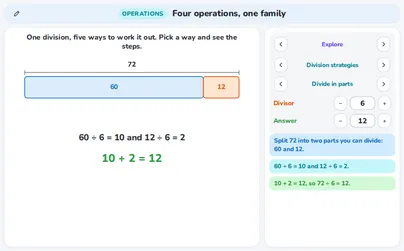
Division way 2: divide in parts

Split the number into two parts that you can divide, divide each part, then add the two answers.
601272
Example
. and ., so .
Rule

Division way 3: by analogy

If you know one division, you also know the ones with extra zeros. Ten times the number gives ten times the answer. Only the place of the digits changes.
Example
, so and .
Rule

Division way 4: the inverse

Think of the opposite sum. A division asks for a missing factor → means . Say the table of 6 until you reach 72.
Example
and .So .
Rule

Division way 5: compensate

Is the number close to a round number you can divide? Divide the round number, then correct the answer by the groups you are over or under.
955100
Example
→ .95 is one group of 5 less than 100, so the answer is 1 less → .
Rule

Transform a product

Change the factors to make the sum easier: split one factor and use a round product. The product stays the same.
Example
→ ..So .
Tip

Double and halve

Halve one factor and double the other. The product stays the same. This helps when one factor is even and the other makes a round number when doubled.
Example
→ halve 18 to 9 and double 25 to 50..So .
Rule

Adding works in any order

You may add several numbers in any order. Look for a pair that makes a round number first.
1275372
Example
. and .Easier → , then .
Watch out!

Subtracting does not work in any order

You always start with the first number and take the others away. You may take them away in either order, but you may not start with another number, and brackets change the sum.
3412753
Example
and . → not the same. → starting with another number gives a different answer.
Definition

What the keys do

C clears the whole sum (the memory stays). CE clears only the number you are typing. M+ adds the display to the memory, M− takes it away, MR recalls the memory and MC clears it.
512+7CE5
Example
, then CE, then 5 shows 5.The 7 was wiped, but the 12 and the + are still there: = shows 17.
Tip

The sign key, the decimal key and = again

± changes plus into minus. The decimal key writes the decimal comma (a point on English calculators). Pressing = again repeats the last step.
115+3==
Example
shows 8.Press = again → . And again: 14.
Definition

The function keys: x², √, 1/x, y^x and ±

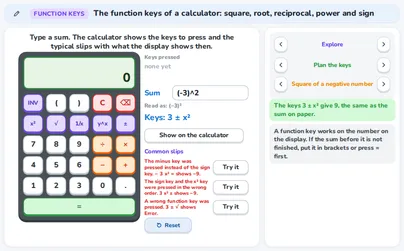
A scientific calculator also has function keys. x², √ and 1/x act at once on the number on the display: type the number first, then press the key. y^x and INV y^x are different: they wait for a second number (type the base, press y^x, type the exponent, then press =); INV y^x gives a root instead of a power. The ± key changes the sign of the number on the display; it is not the minus key, which subtracts. The order of ± and x² matters: press ± before x² to square a negative number. In the application, the tab The keys shows each key on your own number, and Negative numbers compares the two orders.
164±x²
Example
Keys give 16: the sign is set before the square. Keys give −16: only 4 is squared, then the sign changes. And keys give 0.125 (the reciprocal of 8).
−164x²±
Rule

Two kinds of calculator

A simple calculator does each step at once when you press an operator. A scientific calculator follows the order of operations: × and ÷ before + and −. The same keys can show different answers.
143+4×2=113+4×2=
Example
:simple → , then .scientific → , then .
Watch out!

A chain of sums in one go

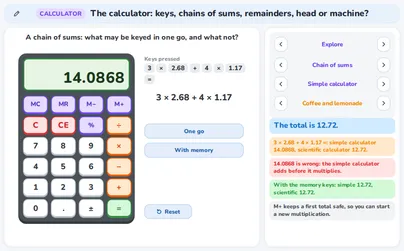
On a simple calculator a long chain is done step by step from left to right, which may not be what you want. Use M+ to keep a first total safe, then start the next multiplication, and finish with MR.
14.08683×2.68+4×1.17=12.72M3×2.68M+4×1.17M+MR
Example
→ the right total is 12.72.simple, in one go → (wrong).scientific: 12.72.simple with memory → M+, M+, MR shows 12.72.
Definition

The display holds 8 digits

A school calculator shows 8 digits in all. A ninth digit is ignored and a long decimal is rounded. So a long answer is not exact.
12345678123456789
Example
Typing 123456789 shows 12345678. (8 digits)..
0.33333331÷3=
Special case

Dividing by 0 shows E

You cannot divide by 0. The calculator shows E (error). Press C and start again.
E1÷0=
Example
shows E.
Rule

Read the remainder from the display

The calculator shows a decimal, not a remainder. The whole part is the number of full groups. Multiply the part after the decimal comma by the divisor: that is the remainder. Check with quotient × divisor + remainder.
3.417÷5=
Example
shows 3.4.The whole part is 3. , so the remainder is 2.Check → . shows 5.6666667 → is about 2 (a rounded display), and .
5.666666717÷3=
Rule

What does the story need?

The same display can mean different answers. Read the story: round up (buses), round down (full bags), use the remainder, or keep the decimals (money, rounded to cents).
555217
Example
17 children, 5 on a bus → shows 3.4. 3 buses hold 15, so you need 4 buses.17 sweets in bags of 3: 5 full bags and 2 left over .17 euro shared between 3 friends → euro each.
Rule

The percent key is different on each calculator

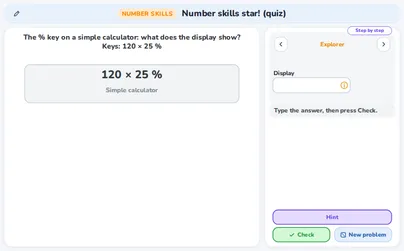
On a simple calculator the % key takes a percent of the first number: after × it gives the percent, after − or + it takes it off or adds it. On a scientific calculator % only divides by 100, so you key the percent yourself.
6480−20%79.880−20%=
Example
(simple). → simple 64, scientific 79.8 (it takes away 0.2).On the scientific one key . → simple 100.
Tip

By head or with the calculator?

Ask yourself which is quicker and safer. Numbers that are small, round or close together: by head. Many digits: the calculator. Either way, check the answer with an estimate.
9.950.0510
Example
→ the numbers are close, by head. → round, by head. → many digits, calculator. → calculator.
Rule

A story with a chain of sums

Plan the steps before you press keys. If the story adds first and then multiplies, the sum needs brackets. A scientific calculator does × first, so press = after the addition (or use brackets), or it gives a wrong total.
41.68.5+1.9=×4=16.18.5+1.9×4=
Example
4 friends each get a pizza (€8.50) and a drink (€1.90). How much in all? and , so €41.60.Keyed as a scientific calculator shows 16.1: wrong.
Rule

Keep dividing after the remainder

A division with a remainder can go on: write a decimal comma, bring down a zero and divide again. When the remainder is 0 the division ends. If it never ends, stop after 3 decimals and round.
56.25450÷8=
Example
→ 8 fits 56 times (448) and 2 is left over.Add a decimal point and bring down a zero: 8 fits in 20 twice (16) and 4 is left; bring down another zero: 8 fits in 40 five times and nothing is left.So . never ends: stop after 3 decimals, ≈ 0.667.
Tip

Choose how big the numbers are

In the problem-posing tool the range chooser sets how big the numbers may be: up to 99, up to 999, up to 9 999 or up to 99 999. Start small. Make the numbers bigger when the story is easy, and then think about whether the calculator is the better tool.
Example
A story with numbers up to 99 → by head.Numbers up to 99 999 → is still easy, but needs the calculator.

Exercises

Which number goes with 6 to make 10? And which goes with 35 to make 100? Easy
Show solution
.
6410
and .
.
4 and 65
Check → and .
Find with “times 10, minus one”. Easy
Show solution
.
Take away one group of 6 → .
Check → fingers: fold down finger 6. 5 fingers before it = 5 tens and 4 fingers after it = 4 ones: 54.
Write as a multiplication and then as a division. Easy
369123 + 3 + 3 + 3 = 124 × 3 = 12
Show solution
Count the threes: there are 4 of them, so .
Take 3 away from 12 four times and you reach 0, so .
and
Check → and .
Write the other three sentences of the fact family of . Easy
Show solution
Swap the two parts → .
Take one part away from the total → .
Take the other part away → .
, and
Check → all four sentences use the same three numbers: 4, 9 and 13.
Use “half of times 10” to find . Easy
Show solution
.
Half of 80 → .
Check → → the factors can be swapped.
You know . What are , and ? Easy
×11223344556677889910104242
Show solution
Swap the factors → , the mirror cell of the table square.
asks , so it is 7. asks , so it is 6.
, and
Check → and → the same product.
Work out and through 10. Medium
Show solution
8 needs 2 to make 10, and .
and .
82515
For → and .
.
and
Check → , so → the same fact family.
Find with the table of 4. Medium
Show solution
is , doubled.
.
Double 28 → .
Check → .
Work out by dividing in parts. Then use it for . Medium
Show solution
Split 72 into 60 and 12, because both are in the table of 6.
and .
.
720 is ten times 72, so the answer is ten times as big → .
and
Check → .
Work out by transforming the product. Medium
Show solution
is a round product, so use .
.
.
Check → .
Work out and also . Are they the same? Medium
Show solution
Take the numbers away one after the other → .
With brackets is worked out first.
.
No → , but
Check → → the order of the two numbers taken away may change, but the brackets change the sum.
What does the display show for , on a simple and on a scientific calculator? Medium
Show solution
The simple calculator does each step at once → .
Then .
The scientific calculator does × first → .
Then .
simple 42, scientific 17
Check → the order of operations says .
Work out by compensating. Hard
Show solution
57 is close to 60, and .
, which is one group of 3.
So the answer is 1 less than 20 → .
Check → .
Work out by doubling and halving. Hard
Show solution
Halve 14 → .
Double 35 → .
.
Check → .
2 packs of cheese at €4.50 and 3 packs of olives at €0.85. Key the total in one go on a simple and on a scientific calculator, and then with the memory. Hard
Show solution
The right total is .
Simple, in one go → , then and → wrong.
Scientific: × first, so the display shows 11.55: right.
Simple with memory → M+, then M+, and MR shows 11.55.
The total is €11.55; one go on a simple calculator gives 10.2 (wrong)
Check → and the total of the simple calculator, 10.2, is less than 11.55.
shows 3.8333333. Find the remainder. Then answer three stories: 23 children and 6 on a bus (how many buses?), 23 sweets in bags of 6 (how many full bags, how many left?) and 23 euro shared between 6 friends (how much each?). Hard
Show solution
The whole part is 3. The part after the decimal comma times 6 is about 5 → is about 5.
Check → .
Buses: 3 buses hold 18, so you need 4 buses.
Bags: 3 full bags and 5 sweets left over.
Money → euro each, rounded to cents.
remainder 5; 4 buses; 3 full bags and 5 left; about €3.83 each
Check → is enough for 23 children, but is not.
What does a simple and what does a scientific calculator show for ? Which keys take 10% of 250 off 250 on the scientific one? Hard
Show solution
Simple: the % key takes 10% of 250, which is 25, and takes it off → .
Scientific: % only divides by 100: 10% is 0.1, so the display shows .
On the scientific one key .
That gives .
simple 225, scientific 249.9; the keys give 225
Check → 10% of 250 is and .
Keep dividing: work out , and to 3 decimals. Hard
Show solution
→ 8 fits 11 times (88) and 2 is left over.
Add a decimal point and bring down a zero: 8 fits in 20 twice (16) and 4 is left.
Bring down another zero: 8 fits in 40 five times and nothing is left → .
never ends: stop after 3 decimals and round: ≈ 0.333.
and
Check → .
Are you a teacher?

Start live lessons with these applications for your whole class. Free to try for one month.

Try it free

Fits these school years

IB (MYP, Diploma): PYP, MYP 1, MYP 2, MYP 3, MYP 4, MYP 5

Cambridge International: Primary, stage 4, Primary, stage 5, Primary, stage 6, Lower Secondary, stage 7, Lower Secondary, stage 9, IGCSE

Netherlands: Groep 5, Groep 6, Groep 7, Groep 8, Year 1, Year 2, Vmbo bb (years 3-4), Vmbo kb (years 3-4), Vmbo gt (years 3-4), Year 3 (havo, vwo)

Türkiye (MEB): Year 3 (MEB), Year 4 (MEB), Year 5 (MEB), Year 6 (MEB)

England (GCSE, A Level): Year 4, Year 5, Year 6, Year 7, Year 9, Year 10 (GCSE), Year 11 (GCSE)

USA (Common Core): Grade 3, Grade 4, Grade 5, Grade 6, Grade 8

What the applications of this topic teach 4 applications

Facts from memory: bonds, sums and tables

  • Knowing the number bonds to 10, 20, 100 and 1 000
  • Knowing the times tables and using their patterns
  • Seeing that swapping factors halves the table facts: 7 × 8 = 8 × 7
  • Finding a division fact from the table: 56 ÷ 8 = 7

Four operations, one family: repeated steps, undo and strategies

  • Linking repeated addition to × and repeated subtraction to ÷
  • Writing a fact family: 24 ÷ 6 = 4 means 24 = 4 × 6
  • Dividing in five ways and choosing a good one
  • Making a product easier: 25 × 32 = 100 × 8

The calculator: keys, chains of sums, remainders, head or machine?

  • Knowing what the calculator keys do: C, CE, M+, MR, MC
  • Seeing that simple and scientific calculators differ: 3 + 4 × 2
  • Reading a remainder from the display: 17 ÷ 5 shows 3.4
  • Choosing between head and calculator for a sum

The function keys: 1/x, x², square root, y^x, INV y^x and the sign key

  • Use the x², √, 1/x, y^x, INV y^x and ± keys of a calculator, in the right order, on my own numbers.
  • Say what the display shows for a list of keys that was pressed, and plan the keys for a sum that I typed myself.
  • Explain common slips: the minus key instead of the sign key, and the sign key and x² in the wrong order.