Volume of a cuboid: unit cubes in layers
This is a demo, open for everybody. A free account opens 140+ applications; Plus opens all of them.
Make a free account Log inWhat this application teaches
- I can fill a box with unit cubes of 1 cm³ and say that the number of cubes is the volume.
- I can count the cubes in one layer (l × w) and then the layers (h), and write V = l × w × h = base area × height; for a cube V = a³.
- I can find a missing edge from the volume and the other two edges.
- I can find all boxes with whole-number edges that have the same volume, and see that the shape changes but the volume stays.
- I can find the volume of an L-shaped block in two ways: add two boxes or take a box away.
- I know 1000 cm³ is 1 litre, and I estimate an answer before I calculate.
- I can say what happens to the volume and the surface of a box when its edges are multiplied: with all three edges × 2 the volume is × 8 and the surface × 4, with one edge × 2 the volume is only × 2.
How to use it
Aim: Fill a box with cubes layer by layer, find the same volume in different boxes, and put two boxes together. Then practise in Guess first, You try and Challenge. A fifth tab shows what multiplying an edge does to volume and surface.
- In Explore choose Layers. Set the length, width and height and press the button to fill one layer at a time. Read the cubes in one layer, the cubes so far and the volume.
- Choose Same volume. Pick a volume and step through all the boxes with whole-number edges: the shape changes, the volume stays.
- Choose Missing edge. Pick Find the length, Find the width or Find the height and divide the volume by the other two edges.
- Choose Two boxes. Pick Add two boxes or Take a box away and set the tall and low part: both ways give the same volume.
- In Guess first choose from three answers. In You try type the answer and press Check. In Challenge find edges, count boxes and fill boxes with larger cubes.
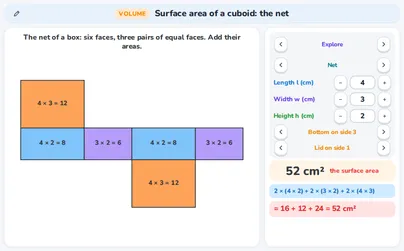
- In Explore choose the fifth tab One edge. Set the length, width and height of a box (for example 2 cm, 3 cm and 4 cm: volume 24 cm³, surface 52 cm²), choose × 2 or × 3 and tick the edges that change (length, width, height). Two boxes stand at one scale, with the volume and the surface of both and their factors: with the height × 2 the volume is 48 cm³ (× 2, not × 8) and the surface 92 cm², not 104 cm²; with all three edges × 2 the volume is 192 cm³ (× 8) and the surface 208 cm² (× 4). Under the cards is a question with three answers and three levels (Starter: one edge, Explorer: two edges, Champion: all three edges, volume or surface). A wrong pick is marked and gets a hint; Next question gives another one.
- Nothing you type or choose in this application is sent anywhere. The keyboard works too: Tab moves from control to control, Enter (or the space bar) presses a button, the up and down arrow keys change the number in a box and Esc closes a help window.
Tip for teachers: Let pupils say the unit: cm³ is cubes, so a volume is never in cm or cm². Ask them to estimate first. Ask: “If one edge is twice as long, is the volume twice as big or eight times?” The boxes are original.
Fits these school years
IB (MYP, Diploma): MYP 1, MYP 2, MYP 3, MYP 4, MYP 5
Cambridge International: Primary, stage 6, Lower Secondary, stage 7, Lower Secondary, stage 8, Lower Secondary, stage 9, IGCSE
Netherlands: Groep 8, Year 2, Vmbo bb (years 3-4), Vmbo kb (years 3-4), Vmbo gt (years 3-4), Vwo · Mathematics C, Year 3 (havo, vwo), Havo (all mathematics courses)
Türkiye (MEB): Year 7 (MEB), Year 8 (MEB), Year 10 (MEB)
England (GCSE, A Level): Year 6, Year 7, Year 8, Year 9, Year 10 (GCSE), Year 11 (GCSE)
USA (Common Core): Grade 6, Grade 7, Grade 8, Geometry